
8.13shpToGeojson
csdn资料:https://blog.csdn.net/fengyekafei/article/details/79355229
github开源项目:https://github.com/AJJackGIS/shp2geojson
下载路径:
整合好的路径:

打好的jar路径:C:\Users\刘琛运\Desktop\java_architect\resources\SuperMap\work\shpToGeojson\自己整合的\整合的jar
一、问题
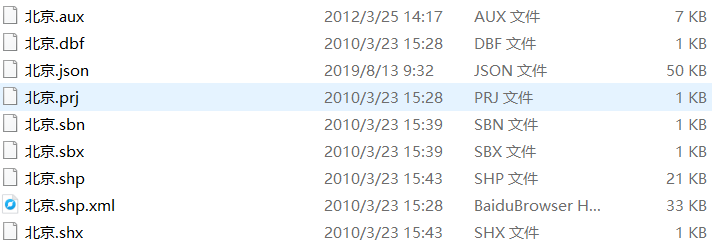
1.多文件
jinja2
不光是一个shp,还有shx,和dbf ,至少这三个文件2.最大的问题:流,现在只能读取文件
3.我打的jar有几百k,是否过大?,它内部引用了其他jar(看二就知道了)
4.返回的是字符串?文件?还是什么?
##二、整合
###1.开源项目github
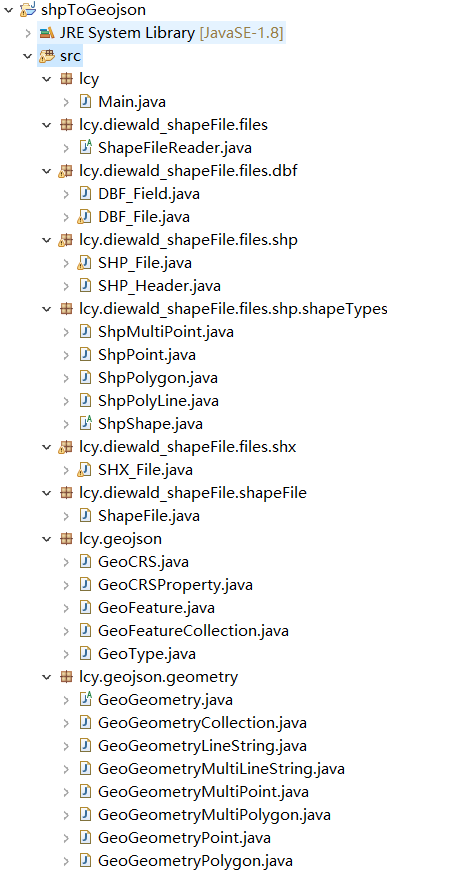
###2.我给它打成jar包
C:\Users\刘琛运\Desktop\java_architect\resources\SuperMap\work\shpToGeojson\自己整合的\整合的jar\shpToGeojson.jar###3.我改装了个工具类
java
/**
	 * // 将一个SHP文件转成GeoJson格式的数据
	 * @param path 文件路徑
	 * @param fileName	文件名
	 */
	public static String shpToGeojson(String path,String fileName) {
        try {
            ShapeFile shapeFile = new ShapeFile(path, fileName).READ();

            List<Map<String, Object>> properties = new ArrayList<>(); // 用来存储所有对象的属性信息

            // 获取属性表名称
            int fieldCount = shapeFile.getDBF_fieldCount(); // 字段个数

            // 获取属性表数据
            int dataCount = shapeFile.getDBF_recordCount(); // 记录条数

            // 取出字段名称和值信息
            for (int i = 0; i < dataCount; i++) {
                Map<String, Object> map = new HashMap<>();

                for (int j = 0; j < fieldCount; j++) {
                    String fieldName = shapeFile.getDBF_field(j).getName(); // 字段名称
                    fieldName = new String(fieldName.getBytes("ISO-8859-1"), "gbk");// =====需要注意的:ISO-8859-1 字符是shapefile读取工具设置的编码,但是arcgis是以gbk编码字符存储的==========//
                    fieldName = (fieldName != null) ? fieldName.trim() : fieldName; // 剔除空白

                    String fieldValue = shapeFile.getDBF_record(i, j); // 字段对应的值
                    fieldValue = new String(fieldValue.getBytes("ISO-8859-1"), "gbk");
                    fieldValue = (fieldValue != null) ? fieldValue.trim() : fieldValue; // 剔除空白

                    map.put(fieldName, fieldValue);
                }
                map.put("color", randomColor()); // 添加一个随机色
                properties.add(map);
            }

            // 获取图形类型====(点、线、面)
            ShpShape.Type shapeType = shapeFile.getSHP_shapeType();
            GeoFeatureCollection collection = new GeoFeatureCollection(); // 用来创建GeoJson对象
            if (shapeType.isTypeOfPoint()) { // 单点
                ArrayList<Object> pointShapes = shapeFile.getSHP_shape();
                for (int i = 0; i < pointShapes.size(); i++) {
                    ShpPoint point = (ShpPoint) pointShapes.get(i);
                    GeoFeature feature = new GeoFeature();
                    GeoGeometryPoint geoPoint = new GeoGeometryPoint();
                    double[] xyz = point.getPoint();
                    double[] xy = new double[]{xyz[0], xyz[1]}; // 去掉z坐标,只保留xy
                    geoPoint.setCoordinates(xy);
                    feature.setGeometry(geoPoint);
                    feature.setProperties(properties.get(i));
                    collection.getFeatures().add(feature);
                }
            } else if (shapeType.isTypeOfMultiPoint()) { // 多点
                ArrayList<Object> pointsShapes = shapeFile.getSHP_shape();
                for (int i = 0; i < pointsShapes.size(); i++) {
                    ShpMultiPoint points = (ShpMultiPoint) pointsShapes.get(i);
                    GeoFeature feature = new GeoFeature();
                    GeoGeometryMultiPoint geoMultiPoint = new GeoGeometryMultiPoint();
                    double[][] num_xyz = points.getPoints();
                    List<double[]> num_xy = new ArrayList<>(); // 去掉z坐标,只保留xy
                    for (int n = 0; n < num_xyz.length; n++) {
                        num_xy.add(new double[]{num_xyz[n][0], num_xyz[n][1]});
                    }
                    geoMultiPoint.setCoordinates(num_xy);
                    feature.setGeometry(geoMultiPoint);
                    feature.setProperties(properties.get(i));
                    collection.getFeatures().add(feature);
                }
            } else if (shapeType.isTypeOfPolyLine()) { // 线
                ArrayList<Object> lineShapes = shapeFile.getSHP_shape();
                for (int i = 0; i < lineShapes.size(); i++) {
                    ShpPolyLine line = (ShpPolyLine) lineShapes.get(i);
                    GeoFeature feature = new GeoFeature();
                    if (line.getNumberOfParts() == 1) { // 单线
                        GeoGeometryLineString geoLine = new GeoGeometryLineString();
                        double[][] num_xyz = line.getPoints(); //[number of points][x,y,z]
                        List<double[]> num_xy = new ArrayList<>(); // 去掉z坐标,只保留xy
                        for (int n = 0; n < num_xyz.length; n++) {
                            num_xy.add(new double[]{num_xyz[n][0], num_xyz[n][1]});
                        }
                        geoLine.setCoordinates(num_xy);
                        feature.setGeometry(geoLine);
                        feature.setProperties(properties.get(i));
                        collection.getFeatures().add(feature);
                    } else { // 多线
                        GeoGeometryMultiLineString geoMultiLine = new GeoGeometryMultiLineString();
                        double[][][] line_num_xyz = line.getPointsAs3DArray(); // [number of polylines][number of points per polyline][x, y, z, m]
                        List<List<double[]>> line_num_xy = new ArrayList<>(); // 去掉z坐标,只保留xy
                        for (int n = 0; n < line_num_xyz.length; n++) {
                            List<double[]> line_points = new ArrayList<>();
                            for (int k = 0; k < line_num_xyz[n].length; k++) {
                                line_points.add(new double[]{line_num_xyz[n][k][0], line_num_xyz[n][k][1]});
                            }
                            line_num_xy.add(line_points);
                        }
                        geoMultiLine.setCoordinates(line_num_xy);
                        feature.setGeometry(geoMultiLine);
                        feature.setProperties(properties.get(i));
                        collection.getFeatures().add(feature);
                    }
                }
            } else if (shapeType.isTypeOfPolygon()) { // 面
                ArrayList<Object> polygonShapes = shapeFile.getSHP_shape();
                for (int i = 0; i < polygonShapes.size(); i++) {
                    ShpPolygon polygon = (ShpPolygon) polygonShapes.get(i);
                    GeoFeature feature = new GeoFeature();
                    if (polygon.getNumberOfParts() == 1) { // 单面
                        GeoGeometryPolygon geoPolygon = new GeoGeometryPolygon();
                        double[][] num_xyz = polygon.getPoints(); // [number of points][x,y,z]
                        List<List<double[]>> num_xy = new ArrayList<>();
                        List<double[]> xy = new ArrayList<>();
                        for (int k = 0; k < num_xyz.length; k++) {
                            xy.add(new double[]{num_xyz[k][0], num_xyz[k][1]});
                        }
                        num_xy.add(xy);
                        geoPolygon.setCoordinates(num_xy);
                        feature.setGeometry(geoPolygon);
                        feature.setProperties(properties.get(i));
                        collection.getFeatures().add(feature);
                    } else { // 多面
                        GeoGeometryMultiPolygon geoMutliPolygon = new GeoGeometryMultiPolygon();
                        double[][][] poly_num_xyz = polygon.getPointsAs3DArray();
                        List<List<List<double[]>>> poly_num_xys = new ArrayList<>();
                        List<List<double[]>> poly_num_xy = new ArrayList<>(); // 去掉z坐标,只保留xy
                        for (int n = 0; n < poly_num_xyz.length; n++) {
                            List<double[]> poly_points = new ArrayList<>();
                            for (int k = 0; k < poly_num_xyz[n].length; k++) {
                                poly_points.add(new double[]{poly_num_xyz[n][k][0], poly_num_xyz[n][k][1]});
                            }
                            poly_num_xy.add(poly_points);
                        }
                        poly_num_xys.add(poly_num_xy);
                        geoMutliPolygon.setCoordinates(poly_num_xys);
                        feature.setGeometry(geoMutliPolygon);
                        feature.setProperties(properties.get(i));
                        collection.getFeatures().add(feature);
                    }
                }
            }
            Gson geoJson = new Gson();
            //json数据
            String json = geoJson.toJson(collection);

            FileUtils.writeStringToFile(new File(path+"\\"+fileName+".json"), json, "utf-8");

            return json;
        } catch (Exception e) {
            e.printStackTrace();
        }
		return null;
	}
		// 生成随机色
	private static String randomColor() {
	    StringBuffer sb = new StringBuffer();
	    for (int i = 0; i < 6; i++) {
	        int n = new Random().nextInt(16);
	        String c = Integer.toHexString(n);
	        sb.append(c);
	    }
	    return "#".concat(sb.toString());
	}
###4.测试类
java
public class TestDemo {

    // 将一个SHP文件转成GeoJson格式的数据
    public static void main(String[] args) {
    	String path = "D:\\map";
    	String fileName = "map";

    	String shpToGeojson = ShpToGeojsonUtils.shpToGeojson(path, fileName);

    	System.out.println(shpToGeojson);
    }
}
###5.成功
经测试输出的json数据没问题
mvn install:install-file -DgroupId=org.geotools -DartifactId=gt-opengis -Dversion=21.2 -Dpackaging=jar -Dfile=D:\SuperMap学习资料\geotools-21.2\gt-opengis-21.2.jar三、尝试用geotools,一堆错,放弃