
4.12微信支付
微信支付:https://pay.weixin.qq.com/
微信支付方式:https://pay.weixin.qq.com/static/product/product_intro.shtml?name=jsapi
开发准备
账号申请
- 申请商户号
- 申请公众号或小程序应用或app
支付方式选择
- PC端:Native支付
- 移动端:H5支付
JSAPI支付和Native支付区别: JSAPI支付的金额需要用户收到输入。 Native支付的金额是用户扫描微信二维码后自动带出。
开发准备
https://pay.weixin.qq.com/wiki/doc/apiv3/open/pay/chapter2_7_1.shtml
申请APPID——申请公众号或小程序应用或app获得
申请mchid ——申请商户号获得
APPID及mchid——申请公众号或小程序应用或app获得
配置API key——根据文档获得
下载并配置商户证书
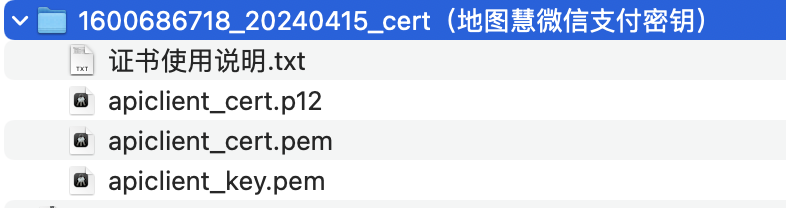
mchid:1600686718
appId:wx6f3cca7cd16125e9
appSecret:a1e164e950e15dcb8a20017f12bcc5a
apiV3Key:IZOBZjAPlCaCjDCPizQCooP1OfXewn4i
私钥:apiclient_key.pem
证书序列号:51BCB144BAF201F5314A0841EAC3239A9F3F2E5F
开发
开发指引:https://pay.weixin.qq.com/wiki/doc/apiv3/open/pay/chapter2_7_2.shtml
不要看最新的:https://pay.weixin.qq.com/wiki/doc/apiv3/apis/chapter3_4_1.shtml
下载微信支付demo:https://github.com/wechatpay-apiv3/wechatpay-apache-httpclient
下载好wechatpay-apache-httpclient-master.zip,仔细看test的代码
依赖
<dependency>
    <groupId>com.github.wechatpay-apiv3</groupId>
    <artifactId>wechatpay-apache-httpclient</artifactId>
    <version>0.4.9</version>
</dependency>
初始化httpclient
@Before
    public void setup() throws IOException {

        // 加载商户私钥(privateKey:私钥字符串)
        PrivateKey merchantPrivateKey = PemUtil
                .loadPrivateKey(new ByteArrayInputStream(privateKey.getBytes("utf-8")));

        // 加载平台证书(mchId:商户号,mchSerialNo:商户证书序列号,apiV3Key:V3密钥)
        AutoUpdateCertificatesVerifier verifier = new AutoUpdateCertificatesVerifier(
                new WechatPay2Credentials(mchId, new PrivateKeySigner(mchSerialNo, merchantPrivateKey)),apiV3Key.getBytes("utf-8"));

        // 初始化httpClient
        httpClient = WechatPayHttpClientBuilder.create()
                .withMerchant(mchId, mchSerialNo, merchantPrivateKey)
                .withValidator(new WechatPay2Validator(verifier)).build();
    }
native下单(生成二维码)
@org.junit.Test
    public void CreateOrder() throws Exception{
        HttpPost httpPost = new HttpPost("https://api.mch.weixin.qq.com/v3/pay/transactions/native");
        // 请求body参数
        // 金额
        JSONObject amount = new JSONObject();
        amount.put("total", 100);
        amount.put("currency", "CNY");
        // 商定
        JSONObject settlement = new JSONObject();
        settlement.put("appid", appId);
        settlement.put("mchid", mchId);
        settlement.put("description","测试");
        settlement.put("out_trade_no", "2014102800030956");
        settlement.put("notify_url", notify_url);
        settlement.put("amount", amount);

        String reqdata = JSON.toJSONString(settlement);

        StringEntity entity = new StringEntity(reqdata,"utf-8");
        entity.setContentType("application/json");
        httpPost.setEntity(entity);
        httpPost.setHeader("Accept", "application/json");

        //完成签名并执行请求
        CloseableHttpResponse response = httpClient.execute(httpPost);
        try {
            int statusCode = response.getStatusLine().getStatusCode();
            if (statusCode == 200) { //处理成功
                System.out.println("success,return body = " + EntityUtils.toString(response.getEntity()));
            } else if (statusCode == 204) { //处理成功,无返回Body
                System.out.println("success");
            } else {
                System.out.println("failed,resp code = " + statusCode+ ",return body = " + EntityUtils.toString(response.getEntity()));
                throw new IOException("request failed");
            }
        } finally {
            response.close();
        }
}草料二维码:https://cli.im/text/other
支付通知(异步通知)
https://pay.weixin.qq.com/docs/merchant/apis/native-payment/payment-notice.html
参数解密
下面详细描述对通知数据进行解密的流程:
- 用商户平台上设置的APIv3密钥【微信商户平台—>账户设置—>API安全—>设置APIv3密钥】,记为key;
- 针对resource.algorithm中描述的算法(目前为AEAD_AES_256_GCM),取得对应的参数nonce和associated_data;
- 使用key、nonce和associated_data,对数据密文resource.ciphertext进行解密,得到JSON形式的资源对象;
{
    "id": "EV-2018022511223320873",
    "create_time": "2015-05-20T13:29:35+08:00",
    "resource_type": "encrypt-resource",
    "event_type": "TRANSACTION.SUCCESS",
    "summary": "支付成功",
    "resource": {
        "original_type": "transaction",
        "algorithm": "AEAD_AES_256_GCM",
        "ciphertext": "",
        "associated_data": "",
        "nonce": ""
    }
}
对resource对象进行解密后,得到的资源对象示例
{
    "transaction_id":"1217752501201407033233368018",
    "amount":{
        "payer_total":100,
        "total":100,
        "currency":"CNY",
        "payer_currency":"CNY"
    },
    "mchid":"1230000109",
    "trade_state":"SUCCESS",
    "bank_type":"CMC",
    "promotion_detail":[
        {
            "amount":100,
            "wechatpay_contribute":0,
            "coupon_id":"109519",
            "scope":"GLOBAL",
            "merchant_contribute":0,
            "name":"单品惠-6",
            "other_contribute":0,
            "currency":"CNY",
            "stock_id":"931386",
            "goods_detail":[
                {
                    "goods_remark":"商品备注信息",
                    "quantity":1,
                    "discount_amount":1,
                    "goods_id":"M1006",
                    "unit_price":100
                },
                {
                    "goods_remark":"商品备注信息",
                    "quantity":1,
                    "discount_amount":1,
                    "goods_id":"M1006",
                    "unit_price":100
                }
            ]
        },
        {
            "amount":100,
            "wechatpay_contribute":0,
            "coupon_id":"109519",
            "scope":"GLOBAL",
            "merchant_contribute":0,
            "name":"单品惠-6",
            "other_contribute":0,
            "currency":"CNY",
            "stock_id":"931386",
            "goods_detail":[
                {
                    "goods_remark":"商品备注信息",
                    "quantity":1,
                    "discount_amount":1,
                    "goods_id":"M1006",
                    "unit_price":100
                },
                {
                    "goods_remark":"商品备注信息",
                    "quantity":1,
                    "discount_amount":1,
                    "goods_id":"M1006",
                    "unit_price":100
                }
            ]
        }
    ],
    "success_time":"2018-06-08T10:34:56+08:00",
    "payer":{
        "openid":"oUpF8uMuAJO_M2pxb1Q9zNjWeS6o"
    },
    "out_trade_no":"1217752501201407033233368018",
    "AppID":"wxd678efh567hg6787",
    "trade_state_desc":"支付成功",
    "trade_type":"MICROPAY",
    "attach":"自定义数据",
    "scene_info":{
        "device_id":"013467007045764"
    }
}
取出订单id和自己需要的数据
通知应答
接收成功: HTTP应答状态码需返回200或204,无需返回应答报文。
接收失败: HTTP应答状态码需返回5XX或4XX,同时需返回应答报文,格式如下:
{
    "code": "FAIL",
    "message": "失败"
}