
页面开发
wxml
双向绑定
html
<view> {{ message }} </view>
Page({
  data: {
    message: 'Hello MINA!'
  }
})
表达式绑定
html
<view wx:if="{{condition}}"> </view>
Page({
  data: {
    condition: true
  }
})
for循环渲染
html
<view wx:for="{{array}}">
  {{index}}: {{item.message}}
</view>
Page({
  data: {
    array: [{
      message: 'foo',
    }, {
      message: 'bar'
    }]
  }
})
html
<view wx:for="{{array}}" wx:for-index="idx" wx:for-item="itemName">
  {{idx}}: {{itemName.message}}
</view>
block wx:for
block wx:for不占用样式<block wx:for="{{[1, 2, 3]}}">
<view> {{index}}: </view>
<view> {{item}} </view>
</block>条件渲染
html
wx:if
在框架中,使用 wx:if="" 来判断是否需要渲染该代码块:

<view wx:if="{{condition}}"> True </view>
也可以用 wx:elif 和 wx:else 来添加一个 else 块:

<view wx:if="{{length > 5}}"> 1 </view>
<view wx:elif="{{length > 2}}"> 2 </view>
<view wx:else> 3 </view>
block wx:if
block wx:if 如果要一次性判断多个组件标签,可以使用一个 <block/> 标签将多个组件包装起来,并在上边使用 wx:if 控制属性。html
<block wx:if="{{true}}">
  <view> view1 </view>
  <view> view2 </view>
</block>
模板
html
定义:
<template name="item">
  <text>{{text}}</text>
</template>
html
引用:
<import src="item.wxml"/>
<template is="item" >
wxss
尺寸大小
iphone6  1rpx = 0.5px      其他版本的比例没有这个好      iphone6屏幕为750rpx=375px

1px = 750px / 设计稿的宽px(单位:rpx)     所以设计稿最好750,你好,我好,大家好
样式导入
1.	在组件内部的不用在wxss导入
2.	引入外部样式,在组件内部的wxss用@import(../../wx/wx)  必须是相对路径
选择器
小程序不支持通配符*js
Page({
    data: {

    }
})
其实就是json格式
data 是数据定义
事件绑定
<view>{{ msg }}</view>
<button bindtap="clickMe">点击我</button>

Page({
  data: {
       msg:0
    },
   //按钮点击方法
  clickMe: function() {
    this.setData(
    	{
    	msg: "Hello World"
    	}
    )
  }
})

1.	bindtap是按钮点击事件, 还有其他的事件
2.	赋值不是 '=',而是对象set方法:this.setData({ msg: "Hello World" })(原因是data是json对象)
执行顺序
1.	url请求success 回调函数 最后执行
2.	setData在success里面赋值,不然为null
3.	this.setData不行,必须 var that = this;
常见组件
https://developers.weixin.qq.com/miniprogram/dev/component/view.html
1.	view -视图容器  约等于div
2.	text -基础内容  约等于span   长按可以复制(selectable)
3.	image -媒体组件 总量不超过2m(一般传网络上)   土豆图床(模拟网上图片)
	mode 等比例缩放,裁剪
4.	swiper -视图容器 轮播图 26节
5.	navigator -导航 约等于a	open-type跳转方式(默认不能跳tabbar)		27,28节
6.	rich-text --基础内容  富文本 nodes 29节
7.	button -表单组件 open-type(内置功能	)
8.	icon -基础内容 图标
9.	radio -表单组件 单选框
10.	checkbox -表单组件  复选框
自定义组件
当每个页面都有的内容, 如导航栏, 需要自定义组件 略站点信息页
用以上语法即可完成开发
地图路线页
html
<map id="map"
  longitude="{{longitude}}" latitude=" {{latitude}}"
  scale="{{scalelevel}}"
  subkey="LZ5BZ-RNYCU-YULVK-2WXWQ-Y4QEZ-3RFYK"
  controls="{{controls}}"
  markers="{{markers}}"
  polyline="{{polyline}}"
  bindcontroltap="controltap"
  bindtap="maptap"
  bindmarkertap="markertap"
  bindregionchange="regionchange"
  show-location
  enable-traffic="{{switchTraffic}}"
  include-points='{{includePoints}}'>
</map>
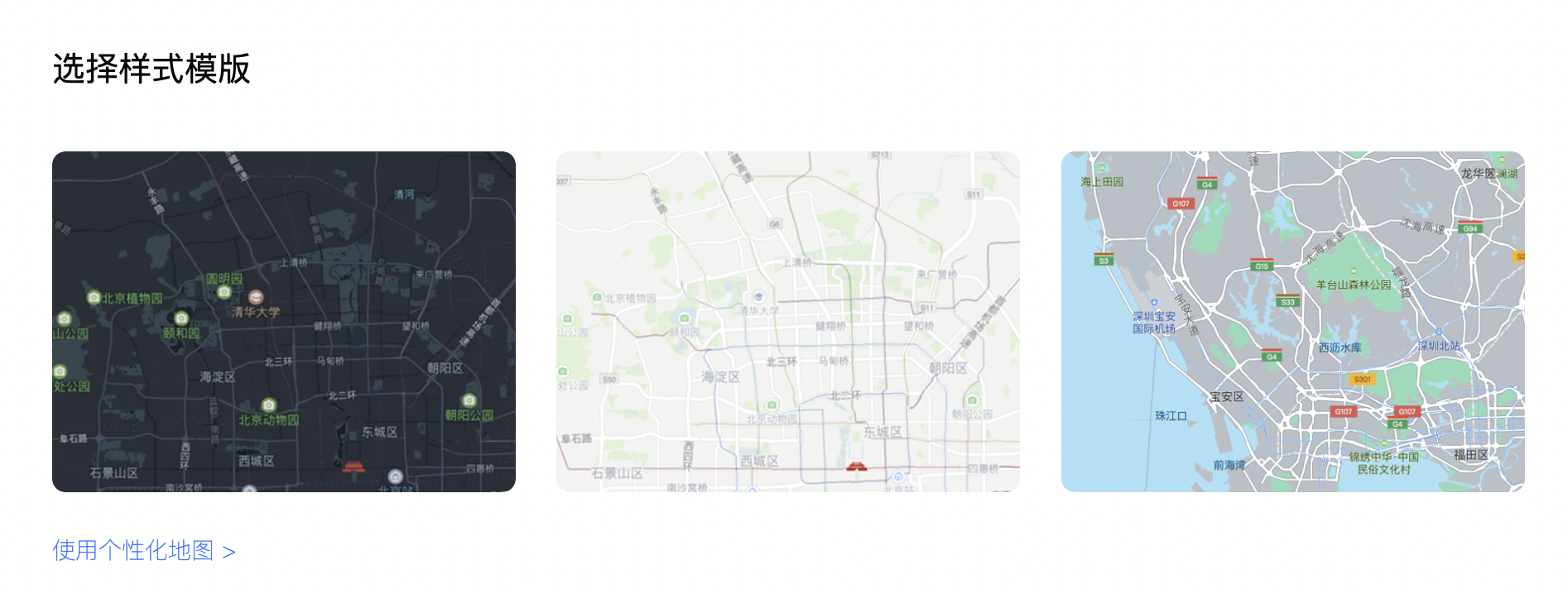
个性化地图-腾讯位置服务
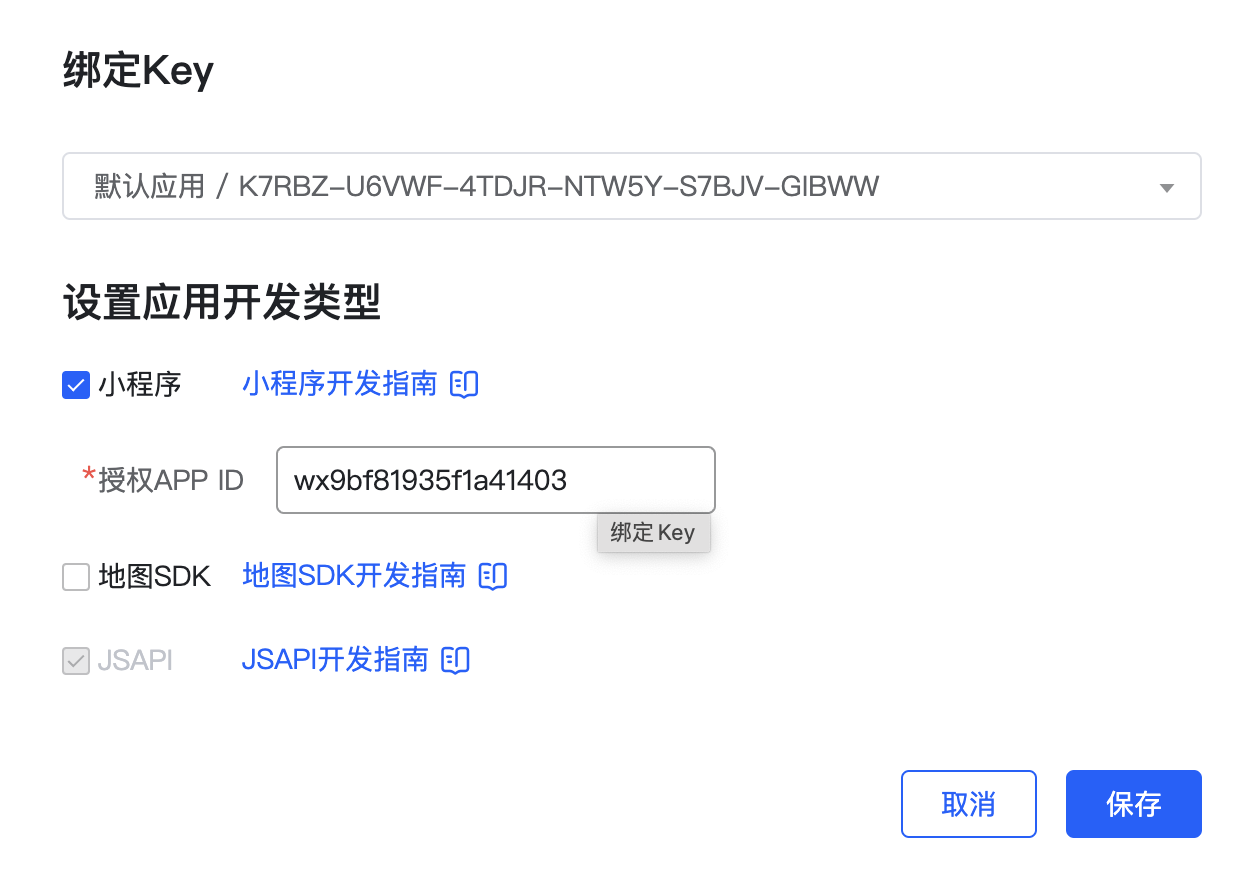
创建地图subkey
subkey="LZ5BZ-RNYCU-YULVK-2WXWQ-Y4QEZ-3RFYK"

授权微信小程序 app id
视图容器组件
目前原生组件均已支持同层渲染,建议使用 view 替代。可覆盖的原生组件 map组件
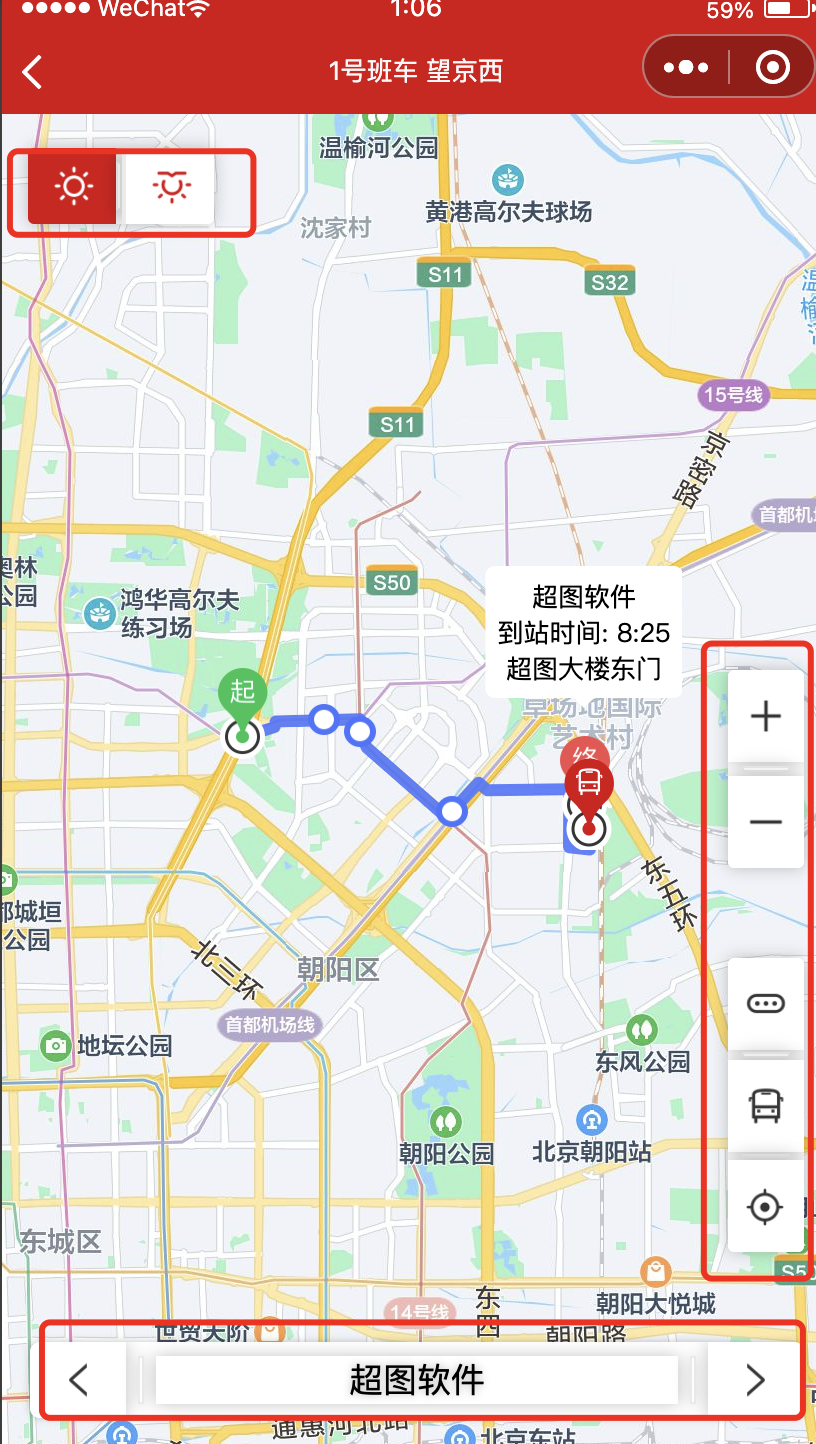
移动到当前位置
html
wxml:
<cover-view class="location-situation-image" bindtap="moveToLocation">
    <cover-image src="../../resources/location_map.png"></cover-image>
</cover-view>
bindtap="moveToLocation" 事件

js:
onReady: function (e) {
    this.mapCtx = wx.createMapContext('map');
},
//控件,移动到自己所在位置
moveToLocation() {
	this.mapCtx.moveToLocation();
},
班车实时定位
后端:http://wiki.supermapol.cn/pages/viewpage.action?pageId=4817003
移动到班车位置
js
wxml:
<cover-view class="location-situation-image" bindtap="moveToBus">
    <cover-image src="../../resources/bus_map.png"></cover-image>
</cover-view>
bindtap="moveToBus" 事件

js:
moveToBus(){
    this.moveToBusLocation();
   // this.getBusLocationInfo();
}
moveToBusLocation: function () {
    // console.log("moveToBusLocation")
    if (buslng && buslat) {
      var lng = this.data.longitude;
      var lat = this.data.latitude;
      // console.log("moveToBusLocation:"+this.data.longitude+","+lat+","+isAdd)
      if (lng === buslng && lat === buslat) {
        if (isAdd) {
          // lng=(lng-0.00000001)+0.00000002;
          // lat=(lat-0.00000001)+0.00000002;
          lng = lng + 0.00000001;
          lat = lat + 0.00000001;
          // console.log("moveToBusLocation加:"+lng+","+lat)
          isAdd = false;
        } else {
          lng = lng - 0.00000001;
          lat = lat - 0.00000001;
          // console.log("moveToBusLocation减:"+lng+","+lat)
          isAdd = true;
        }
      } else {
        lng = buslng;
        lat = buslat;
      }
      // console.log("moveToBusLocation后:"+lng+","+lat)
      this.setData({
        longitude: lng,
        latitude: lat
      });
    }
  }

给data的longitude和latitude赋值,就会以该坐标为中心
上下班切換
js
wxml:
<cover-view class="work-route">
  <cover-view class="work-route-image" bindtap="showWorkRoute">
    <cover-image src="../../resources/work_map.png"></cover-image>
  </cover-view>
  <cover-view class="border-colume" />
  <cover-view class="work-route-image" bindtap="showNoWorkRoute">
    <cover-image src="../../resources/nowork_map.png"></cover-image>
  </cover-view>
</cover-view>

app.js
  globalData:{
    routeId:null,
  }

js:
var routeid;//上班id
var routeIdChange;//实时id
var outrouteid;//下班id
var workPolylineCache;//上班路线缓存
var noworkPolylineCache;//下班路线缓存

页面记载时,调用initSiteRoute();

切换时,调用initSiteRoute();
//上下站点routeId,显示路线
  initSiteRoute: function(routeIdstr){
    points = []//初始化站点
    var that = this;
    console.log("app.globalData.routeId="+routeIdstr)
    if(routeIdstr){
      routeIdChange = this.getRouteIdByTime(String(routeIdstr))
      console.log("routeId="+routeIdChange)
      var url = "https://www.supermapol.com/ontheway/web/stops?routeID=" + routeIdChange;
      wx.request({
        url: url,
        success: function (res) {
          var stops = res.data.stops;
          for (var i = 0; i < stops.length; i++) {
            var name = stops[i].stopName;
            var des = stops[i].stopDescription;
            var longitude =  stops[i].x;
            var latitude = stops[i].y;
            if (!des) {
              des = stops[i].stopName;
            }
            //封装经纬度,给pilyline,显示路线
            var point = {};
            point.longitude = String(longitude);
            point.latitude = String(latitude);
            points.push(point);
          }
          console.log("points="+JSON.stringify(points));
          if(points){
            that.setData({
              polyline: [{
                points: points,
                color:"#4875FC",
                width: 6,
                arrowLine: true
              }]
            })
          }
        }
      })
    }
  },

  //如果routeId包含2个值,则中午12点前为上班,12点后为下班
  getRouteIdByTime(routeId){
    if(routeId.indexOf(",")>=0){
      var routeIds = routeId.split(",");
      var hour = new Date().getHours();
      if(hour <= 24 && hour >= 12){
        return routeIds[1];
      }
      return routeIds[0];
    }
    return routeId;
  },
地图组件
放大缩小
map属性:scale=""
html
<!-- 放大缩小 -->
<cover-view class="zoominout">
  <cover-view class="zoomin" bindtap="mapZoom" id="zoomin" hover-class="location-situation-image-hover">
    <cover-image src="../../resources/zoomin.png" />
  </cover-view>
  <cover-view class="border-row" />
  <cover-view class="zoomout" bindtap="mapZoom" id="zoomout" hover-class="location-situation-image-hover">
    <cover-image src="../../resources/zoomout.png" />
  </cover-view>
</cover-view>
js
//控件:放大缩小地图
  mapZoom(e) {
    var that = this;
    //1.获取中心点并重新赋值
    that.mapCtx.getCenterLocation({
      success: function (res) {
        that.setData({
          longitude: res.longitude,
          latitude: res.latitude
        });
      }
    })
    //2.根据当前中心点,放大缩小,
     that.mapCtx.getScale({
      success: function (res) {
        var maplevel = res.scale;
        if (maplevel >= 3 && maplevel <= 20) {
          e.currentTarget.id === "zoomout" ? maplevel-- : maplevel++
          if (maplevel >= 3 && maplevel <= 20) {
            that.setData({
              scalelevel: maplevel
            });
          }
        }
        }
     })
  },
路况
map属性:enable-traffic=""
js
<cover-view class="location-situation-image" hover-class="location-situation-image-hover" bindtap="showTraffic">

//控件,切换显示路况
  showTraffic(){
    var that = this;
    //1.切换,开启:true,关闭:false
    switchTraffic = !switchTraffic;
    //2.开启:颜色透明,关闭:颜色不透明
    if(switchTraffic){
      routeColor = "#4875FCB2";
      polyline[0].color = routeColor;
    }else{
      routeColor = "#4875FCE5";
      polyline[0].color = routeColor;
    }
marker气泡
标记点用于在地图上显示标记的位置
双向绑定: markers=""
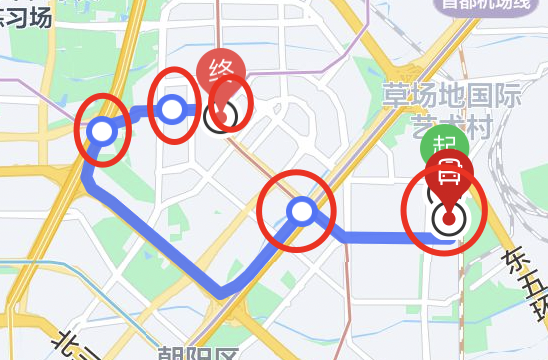
js
//1.封装坐标点及相关信息,给maker,显示各个站点
            var marker = {};
            marker.id = id;
            marker.longitude = longitude;
            marker.latitude = latitude;
            marker.width = picsize-14;
            marker.height = picsize-14;
            marker.iconPath = siteicon;
            marker.anchor = {x: .5, y: .5};
            //设置起始气泡图片
            if(i == 0){
              marker.iconPath = originicon;
              marker.width = picsize-5;
              marker.height = picsize+16;
              marker.anchor = {x: .5, y: .8} ;
            }
            //设置终点气泡图片
            if(i == stops.length - 1){
              marker.iconPath = destinationicon;
              marker.width = picsize-5;
              marker.height = picsize+16;
              marker.anchor = {x: .5, y: .8} ;
            }
            //2.1封装marker的标记点上方的气泡窗口
            var sitecallout={//站点气泡
              padding: 6,
              borderRadius:5,
              fontSize: "13px",
              bgColor:"#ffffff",
              //微信版本导致气泡发生偏移,暂时设置center,等修复后改回left
              textAlign:'center',
              display: 'BYCLICK',
            };
            //3.封装气泡
            sitecallout.content = callout_des;
            marker.callout = sitecallout;
            sitemarker.push(marker)
polyline路线
指定一系列坐标点,从数组第一项连线至最后一项。绘制彩虹线时,需指定不同分段的颜色,如 points 包含 5 个点,则 colorList 应传入 4 个颜色值;若 colorList 长度小于 points.length - 1,则剩下的分段颜色与最后一项保持一致。
双向绑定: polyline=""
js
var polyline = [{
  points: points,
  color:"#4875FCE5",
  width: 6,
  arrowLine: true,
}];
精确路线绘制
路线文件:https://www.supermapol.com/ontheway/stopPolyline.json
点:39.99425,116.44758

开通路线规划插件(没用,了解)
文档:https://lbs.qq.com/miniProgram/plugin/pluginGuide/routePlan
https://developers.weixin.qq.com/community/servicemarket/detail/00024cc78b8140578af86e6905b415
注册腾讯位置服务
注册腾讯位置服务:https://lbs.qq.com/product/miniapp/home/
小程序后台“开发-开发者工具-腾讯位置服务”申请开通
腾讯位置开通key:https://lbs.qq.com/dev/console/key/add
腾讯地图服务:
https://apis.map.qq.com/ws/direction/v1/driving/?from=39.99425,116.44758&to=39.98517,116.50634&waypoints=39.99707,116.46151;39.99543,116.46795&output=json&callback=cb&key=K7RBZ-U6VWF-4TDJR-NTW5Y-S7BJV-GIBWW
from:起点
to:终点
waypoints:沿途点
返回结果:精确的点坐标
"polyline":[39.994251,116.447578,153,146,548,359,0,0,103,209,22,115,22,250,112,441,238,704,57,186,116,501,146,493,160,863,141,658,77,487,0,0,28,127,625,42,0,0,79,75,36,71,9,159,61,1900,45,2454,51,3692,0,0,41,2222,-6,900,33,1323,53,1174,19,656,0,0,-157,133,-1632,64,0,0,-293,14,-261,50,-254,77,-334,141,-85,50,-345,257,-177,157,-284,339,-281,414,-400,591,-1576,2377,-571,838,-359,567,-1720,2622,-592,841,-130,206,-237,372,-546,787,-1178,1691,-319,427,-220,326,-331,490,-605,981,0,0,15,247,1946,2160,650,700,1089,1229,0,0,79,319,754,904,0,0,-342,538,-300,440,-266,349,-59,45,0,0,-36,123,15,3806,38,3667,64,138,27,97,6,1400,-36,685,-1,593,13,2693,21,986,2,915,21,1674,0,0,-254,-17,-497,3,0,0,2,211,0,0,-1257,-6,-992,23,0,0,8,-141,0,0,126,5]