
11.3paypal 支付流程
sdk
Rest-api-sdk,已被deprecated,但可继续用,只是官方不会继续添加新功能
Checkout SDK,推荐使用:
- Authorize 模式
- Capture 模式
##一、paypal接口搭建
###1.创建配置文件
order-payment-paypal.xml
<?xml version="1.0" encoding="UTF-8"?>
<beans
    xmlns="http://www.springframework.org/schema/beans"
    xmlns:xsi="http://www.w3.org/2001/XMLSchema-instance"
    xmlns:util="http://www.springframework.org/schema/util"
    xsi:schemaLocation="
       http://www.springframework.org/schema/beans http://www.springframework.org/schema/beans/spring-beans.xsd
       http://www.springframework.org/schema/util http://www.springframework.org/schema/util/spring-util-2.5.xsd">

	<!--jersey接口路径-->
    <bean id="servletPath" class="java.lang.String" factory-method="valueOf">
        <constructor-arg value="/web/orderpayment/paypal"></constructor-arg>
    </bean>

    <!--加入jersey配置,与其他配置文件一样的形式-->
    <bean class="com.isupermap.jersey.ConfigurableApplication">
        <property name="rootResource" ref="paypalResource"></property>
        <property name="messageBodyWriters">
            <util:list value-type="javax.ws.rs.ext.MessageBodyWriter">
                <ref bean="#{T(com.isupermap.cloudmanagement.constants.BeanId).JSON_WRITER.id()}"/>
            </util:list>
        </property>
    </bean>

     <!--spring bean容器-->
    <bean id="paypalResource" class="com.isupermap.cloudmanagement.rest.resources.impl.PayPalResource">

    </bean>
</beans>
###2.配置加入gishost-rest.xml主配置
<value>classpath:com/isupermap/cloudmanagement/jerseyapplications/order-payment-paypal.xml</value>###3.添加paypay支付依赖
在 modules/pom.xml
<paypal.version>1.0.2</paypal.version>

<!--核心类-->
<dependency>
    <groupId>com.paypal.sdk</groupId>
    <artifactId>checkout-sdk</artifactId>
    <version>${paypal.version}</version>
</dependency>

order-payment-impl
<dependency>
    <groupId>com.paypal.sdk</groupId>
    <artifactId>checkout-sdk</artifactId>
</dependency>
###3.创建接口类
PayPalResource
http://127.0.0.1:8099/api/web/orderpayment/paypal/redirect/02-2021110414115611560000##二、业务流程
###1.生成paypal收银台页面
####1.创建订单
 /**
     * 创建订单的方法,生成收银台地址
     * @throws
     */
    public String createOrder() throws IOException {
        OrdersCreateRequest request = new OrdersCreateRequest();
        request.header("prefer","return=representation");
        request.requestBody(buildRequestBody());
        PayPalClient payPalClient = new PayPalClient();
        HttpResponse<Order> response = null;
        try {
            response = payPalClient.client(mode, clientId, clientSecret).execute(request);
        } catch (IOException e) {
            log.error("create paypal order is fail:{}", e.getMessage());
        }
        String approve = "";
        if (response.statusCode() == 201) {
            log.info("Status Code = {}, Status = {}, OrderID = {}, Intent = {}", response.statusCode(), response.result().status(), response.result().id(), response.result().checkoutPaymentIntent());
            for (LinkDescription link : response.result().links()) {
                log.info("Links-{}: {}    \tCall Type: {}", link.rel(), link.href(), link.method());
                if(link.rel().equals("approve")) {
                    approve = link.href();
                }
            }
            String totalAmount = response.result().purchaseUnits().get(0).amountWithBreakdown().currencyCode() + ":" + response.result().purchaseUnits().get(0).amountWithBreakdown().value();
            log.info("Total Amount: {}", totalAmount);
            String json= new JSONObject(new Json().serialize(response.result())).toString(4);
            log.info("createOrder response body: {}", json);
        }
        return approve;
    }
重要参数说明:
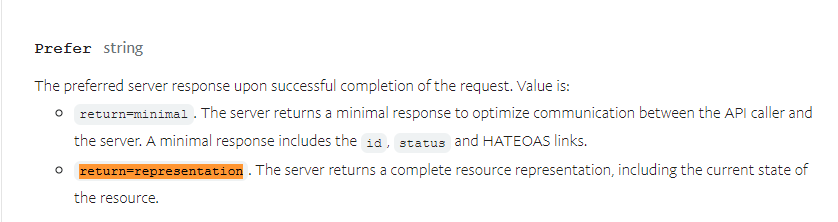
Prefer细绳
成功完成请求后的首选服务器响应。价值是:
return=minimal. 服务器返回最小响应以优化 API 调用方和服务器之间的通信。最低限度的响应包括id、status和 HATEOAS 链接。
return=representation. 服务器返回一个完整的资源表示,包括资源的当前状态。
####2.生成订单主体信息
/**
     * 生成订单主体信息
     */
    private OrderRequest buildRequestBody() {
        OrderRequest orderRequest = new OrderRequest();
        orderRequest.checkoutPaymentIntent(CAPTURE);

        ApplicationContext applicationContext = new ApplicationContext()
                .brandName(BRANDNAME)
                .landingPage(LANDINGPAGE)
                .cancelUrl(CANCEL_URL)
                .returnUrl(RETURN_URL)
                .userAction(USERACTION)
                .shippingPreference(SHIPPINGPREFERENCE);
        orderRequest.applicationContext(applicationContext);

        List<PurchaseUnitRequest> purchaseUnitRequests = new ArrayList<PurchaseUnitRequest>();
        @SuppressWarnings("serial")
        PurchaseUnitRequest purchaseUnitRequest = new PurchaseUnitRequest()
                .description("云许可")
                .customId("P2020052514440004")
                .invoiceId("P2020052514440004")
                .amountWithBreakdown(new AmountWithBreakdown()
                        .currencyCode("USD")
                        .value("100.00")// value = itemTotal + shipping + handling + taxTotal + shippingDiscount;
                        .amountBreakdown(new AmountBreakdown()
                                .itemTotal(new Money().currencyCode("USD").value("100.00")) // itemTotal = Item[Supernote A6](value × quantity) + Item[帆布封套](value × quantity)
                                .shipping(new Money().currencyCode("USD").value("0.00"))
                                .handling(new Money().currencyCode("USD").value("0.00"))
                                .taxTotal(new Money().currencyCode("USD").value("0.00"))
                                .shippingDiscount(new Money().currencyCode("USD").value("0.00"))))
                .items(new ArrayList<Item>() {
                    {
                        add(new Item().name("SuperMap iServer").description("supermap online 云许可")
                                .unitAmount(new Money()
                                        .currencyCode("USD")
                                        .value("100.00"))
                                .quantity("1"));
//                        add(new Item().name("帆布封套").description("黑色帆布保护封套")
//                                .unitAmount(new Money()
//                                        .currencyCode("USD")
//                                        .value("20.00"))
//                                .quantity("1"));
                    }
                })
                .shippingDetail(new ShippingDetail()
                        .name(new Name().fullName("RATTA"))
                        .addressPortable(new AddressPortable()
                                .addressLine1("成都")
                                .addressLine2("双流")
                                .adminArea2("超图大厦")
                                .adminArea1("成都市")
                                .postalCode("20000")
                                .countryCode("CN")));
        purchaseUnitRequests.add(purchaseUnitRequest);
        orderRequest.purchaseUnits(purchaseUnitRequests);
        return orderRequest;
}重要参数说明:
1.ApplicationContext
ApplicationContext applicationContext = new ApplicationContext()
                .brandName(BRANDNAME)
                .landingPage(LANDINGPAGE)
                .cancelUrl(CANCEL_URL)
                .returnUrl(RETURN_URL)
                .userAction(USERACTION)
                .shippingPreference(SHIPPINGPREFERENCE);
https://developer.paypal.com/docs/api/orders/v2/#orders_create
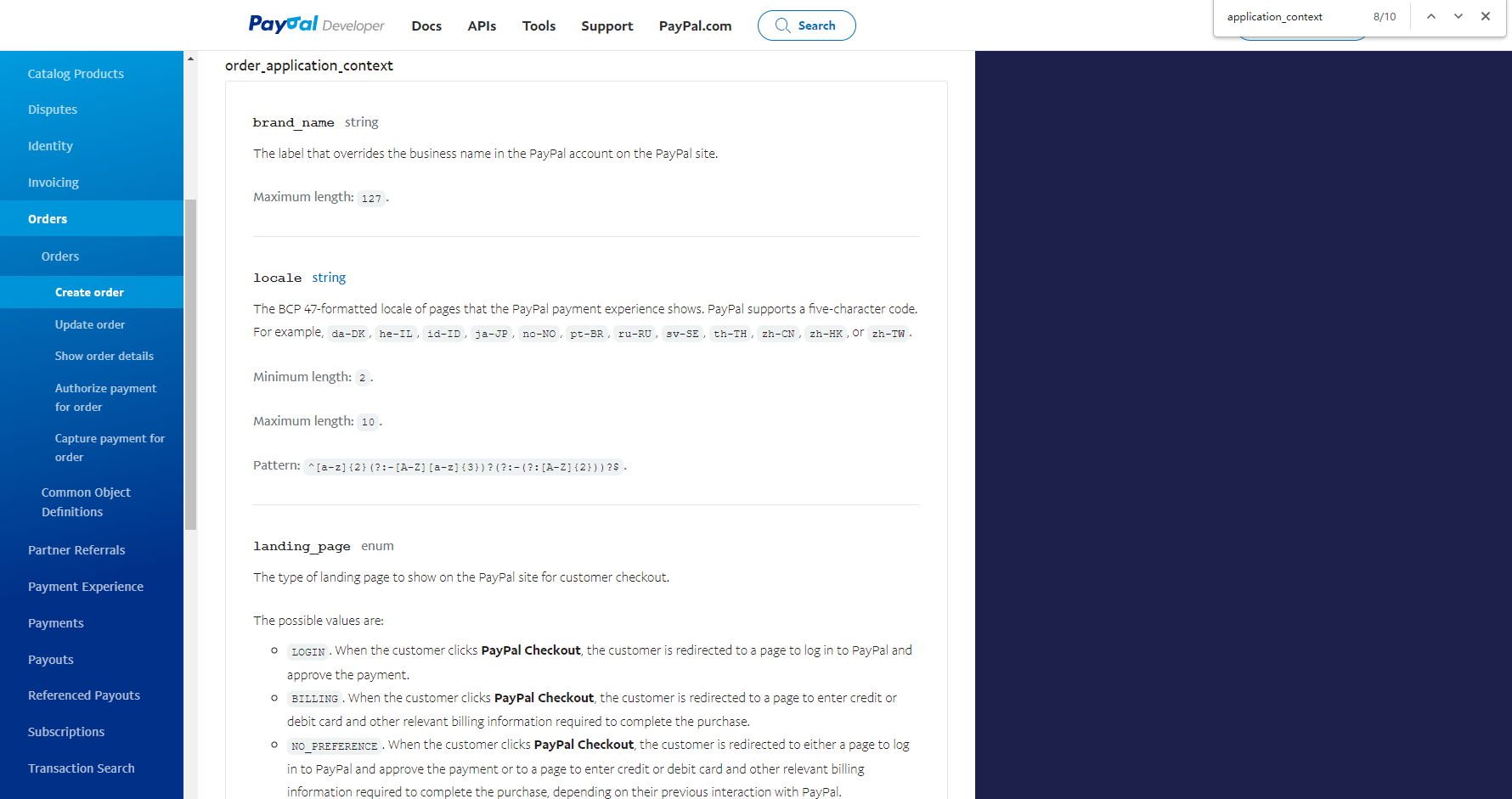


/**
     * CAPTURE. 商家打算在客户付款后立即获取付款。
     * AUTHORIZE. 商家打算在客户付款后授权付款并搁置资金。授权付款最好在授权后三天内获取,但最多可获取 29 天。三天兑现期过后,原授权付款到期,您必须重新授权付款。
     * 您必须提出单独的请求以按需获取付款。当您的订单中有多个 `purchase_unit` 时,不支持此意图。
     */
    public static final String CAPTURE = "CAPTURE";
    /**
     * 该标签将覆盖PayPal网站上PayPal帐户中的公司名称
     */
    public static final String BRANDNAME = "SuperMap";
    /**
     * LOGIN。当客户单击PayPal Checkout时,客户将被重定向到页面以登录PayPal并批准付款。
     * BILLING。当客户单击PayPal Checkout时,客户将被重定向到一个页面,以输入信用卡或借记卡以及完成购买所需的其他相关账单信息
     * NO_PREFERENCE。当客户单击“ PayPal Checkout”时,将根据其先前的交互方式将其重定向到页面以登录PayPal并批准付款,或重定向至页面以输入信用卡或借记卡以及完成购买所需的其他相关账单信息使用PayPal。
     * 默认值:NO_PREFERENCE
     */
    public static final String LANDINGPAGE = "NO_PREFERENCE";
    /**
     * CONTINUE。将客户重定向到PayPal付款页面后,将出现“ 继续”按钮。当结帐流程启动时最终金额未知时,请使用此选项,并且您想将客户重定向到商家页面而不处理付款。
     * PAY_NOW。将客户重定向到PayPal付款页面后,出现“ 立即付款”按钮。当启动结帐时知道最终金额并且您要在客户单击“ 立即付款”时立即处理付款时,请使用此选项。
     */
    public static final String USERACTION = "CONTINUE";
    /**
     * GET_FROM_FILE。使用贝宝网站上客户提供的送货地址。
     * NO_SHIPPING。从PayPal网站编辑送货地址。推荐用于数字商品
     * SET_PROVIDED_ADDRESS。使用商家提供的地址。客户无法在PayPal网站上更改此地址
     */
    public static final String SHIPPINGPREFERENCE = "SET_PROVIDED_ADDRESS";

    /**
     *  取消付款后回调地址
     */
    public static final String CANCEL_URL = "http://www.supermapol.com/paypal/ipn/back";

    /**
     *  批准付款后异步回调地址,需要在账户里设置
     */
    public static final String RETURN_URL = "http://www.supermapol.com/paypal/ipn/back";
2.PurchaseUnitRequest(purchase_unit_request)
PurchaseUnitRequest purchaseUnitRequest = new PurchaseUnitRequest()
                .description("云许可")
                .customId("P2020052514440004")
                .invoiceId("P2020052514440004")
                .amountWithBreakdown(new AmountWithBreakdown()
                        .currencyCode("USD")
                        .value("100.00")// value = itemTotal + shipping + handling + taxTotal + shippingDiscount;
                        .amountBreakdown(new AmountBreakdown()
                                .itemTotal(new Money().currencyCode("USD").value("100.00")) // itemTotal = Item[Supernote A6](value × quantity) + Item[帆布封套](value × quantity)
                                .shipping(new Money().currencyCode("USD").value("0.00"))
                                .handling(new Money().currencyCode("USD").value("0.00"))
                                .taxTotal(new Money().currencyCode("USD").value("0.00"))
                                .shippingDiscount(new Money().currencyCode("USD").value("0.00"))))
                .items(new ArrayList<Item>() {
                    {
                        add(new Item().name("SuperMap iServer").description("supermap online 云许可")
                                .unitAmount(new Money()
                                        .currencyCode("USD")
                                        .value("100.00"))
                                .quantity("1"));
//                        add(new Item().name("帆布封套").description("黑色帆布保护封套")
//                                .unitAmount(new Money()
//                                        .currencyCode("USD")
//                                        .value("20.00"))
//                                .quantity("1"));
                    }
                })
                .shippingDetail(new ShippingDetail()
                        .name(new Name().fullName("RATTA"))
                        .addressPortable(new AddressPortable()
                                .addressLine1("成都")
                                .addressLine2("双流")
                                .adminArea2("超图大厦")
                                .adminArea1("成都市")
                                .postalCode("20000")
                                .countryCode("CN")));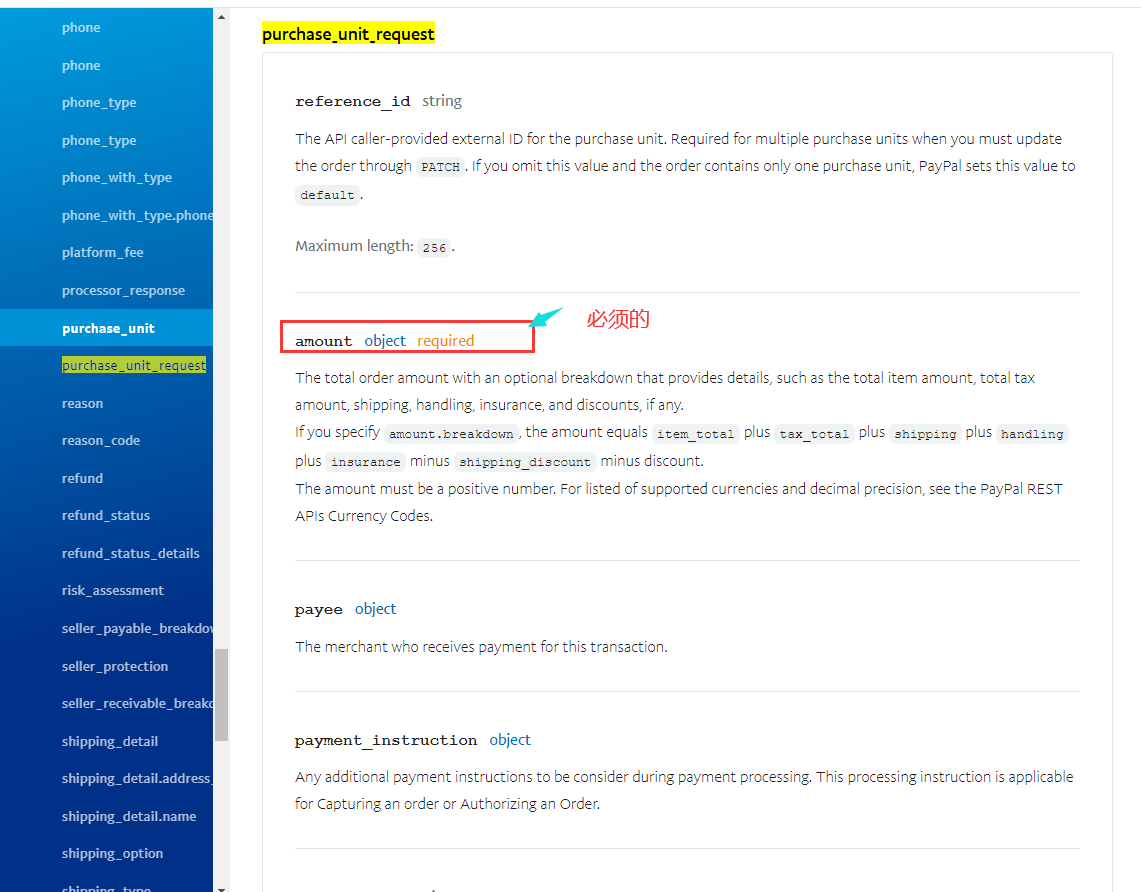
点击进入对象里面:

你可以把订单的购物清单详情发送给paypal,这里我认为没有必要,只设置必须要的 amount对象
- 这里也可以设置收件人地址 (看需求)
amount目的  必需的
总订单金额和可选明细,提供详细信息,例如总项目金额、总税额、运输、处理、保险和折扣(如果有)。
如果指定amount.breakdown,金额等于item_total加上tax_total加shipping加上handling加insurance减shipping_discount减优惠。
金额必须是正数。有关支持的货币和小数精度的列表,请参阅 PayPal REST API货币代码.

注意:
invoiceId:(可以设置发票id,达到重复交易)
检测到重复的发票 ID。通过设置您的帐户来避免潜在的重复交易,以便每笔交易都需要唯一的发票 ID。
amount对象里面又有两个必须的字段设置
currency_code细绳必需的
标识货币的三字符 ISO-4217 货币代码。

最小长度:3.

最大长度:3.

value细绳必需的
值,可能是:
像JPY这样的货币的整数通常不是小数。
像TND这样的货币的小数部分被细分为千分之一。
有关货币代码所需的小数位数,请参阅货币代码。

最大长度:32.

图案:^((-?[0-9]+)|(-?([0-9]+)?[.][0-9]+))$。
地址里这个字段 必需
坑点:
地址的adminArea2 也必须有:
错误返回:
{"name":"UNPROCESSABLE_ENTITY","details":[{"field":"/purchase_units/@reference_id=='default'/shipping/address/admin_area_2","issue":"CITY_REQUIRED","description":"The specified country requires a city (address.admin_area_2)"}],"message":"The requested action could not be performed, semantically incorrect, or failed business validation.","debug_id":"85e7eac023df0","links":[{"href":"https://developer.paypal.com/docs/api/orders/v2/#error-CITY_REQUIRED","rel":"information_link","method":"GET"}]}


{"name":"UNPROCESSABLE_ENTITY","details":[{"field":"/purchase_units/@reference_id=='default'/shipping/address/postal_code","issue":"POSTAL_CODE_REQUIRED","description":"The specified country requires a postal code"}],"message":"The requested action could not be performed, semantically incorrect, or failed business validation.","debug_id":"7595142bb3122","links":[{"href":"https://developer.paypal.com/docs/api/orders/v2/#error-POSTAL_CODE_REQUIRED","rel":"information_link","method":"GET"}]}

**address.admin_area_2  ,不知道为什么,可能是bug,可能是版本
**a postal code,不知道为什么,可能是bug,可能是版本
###2.回调(同步回调和异步回调)

同步回调(pdt):https://developer.paypal.com/docs/api-basics/notifications/payment-data-transfer/
异步回调(ipn):https://developer.paypal.com/docs/api-basics/notifications/ipn/
ipn(异步)和pdt(同步):https://developer.paypal.com/docs/api-basics/notifications/ipn/IPNPDTAnAlternativetoIPN/
这里我们同步回调和异步回调都用

1.同步回调
在点击立即支付完成后自动同步回调到项目配置的链接,
2.异步回调
到了这里基本上已经接入完毕, 现在还剩余异步回调,PayPal的异步回调我使用的 是*IPN ,这个回调是需要登录进你的PayPal账号,选择账户设置——>选择通知——>选择及时付款通知——>点击更新——>填写你的回调地址路径,开启并保存*
https://developer.paypal.com/docs/api-basics/notifications/ipn/


##回调验签
个人认为使用Checkout 版本,无需进行验签,待讨论
原因:在回调后,捕获订单这步就是在进行验签
##避免异步回调重复处理
利用单条更新sql的原子性 ,其result > 0 来避免重复操作,
例如:cas users表
update users set nickname = 'weizhoujie' where id = 944959
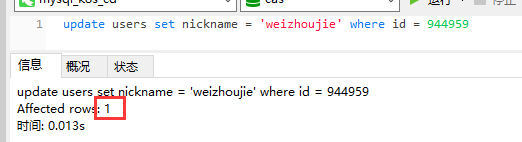

出第一次结果为1>0, 多线程因为数据库更新sql的原子性结果为0订单id交互(重要)

坑点:
.customId("P2020052514440004")   这个拿不到
API 调用方提供的外部 ID。用于协调客户交易与 PayPal 交易。出现在交易和结算报告中,但对付款人不可见。


把orderId通过改字段传输
reference_id
API 调用方为购买单位提供的外部 ID。当您必须通过 更新订单时,需要多个采购单位PATCH。如果您省略此值且订单仅包含一个购买单位,则 PayPal 会将此值设置为default。
##税率
金额规则:
总金额=商品总价+运费+handling+税总金额-运费折扣
商品总价=各(商品单价x数量)的累加
税总金额=各(商品税x数量)的累加
item_total目的
所有项目的小计。如果请求包含purchase_units[].items[].unit_amount. 必须等于(items[].unit_amount * items[].quantity)所有项目的总和。item_total.value不能是负数。

shipping目的
给定 内所有商品的运费purchase_unit。shipping.value不能是负数。

handling目的
给定范围内所有项目的手续费purchase_unit。handling.value不能是负数。

tax_total目的
所有项目的总税额。如果请求包含purchase_units.items.tax. 必须等于(items[].tax * items[].quantity)所有项目的总和。tax_total.value不能是负数。

insurance目的
给定范围内所有项目的保险费purchase_unit。insurance.value不能是负数。

shipping_discount目的
给定 内所有商品的运费折扣purchase_unit。shipping_discount.value不能是负数。

discount目的
给定 内所有商品的折扣purchase_unit。discount.value不能是负数。
##币种
https://developer.paypal.com/docs/api/reference/currency-codes/

paypal的币种
##沙箱测试账号
买
sb-eod5g8314683@personal.example.com
H2G^>0Ms

卖
sb-z43gda8318281@business.example.com
XVBuxX$4参考文档:https://blog.csdn.net/qq_36341832/article/details/106334844
ipn回调参考:https://blog.csdn.net/zxl646801924/article/details/80483333